
The Problem
Every organization is drowning in documents. Contracts stacked in SharePoint folders. Invoices scanned and forgotten. Application forms processed by hand. Equipment photos that carry critical information no system can read. The volume isn't the problem — the inaccessibility is.
Traditional OCR tools made a promise they couldn't keep. Yes, they could digitize a page — but digitizing text and understanding it are two entirely different things. A scanned invoice sitting in a folder is no more useful than a paper one in a filing cabinet if no one can query it, cross-reference it, or act on it in real time. Organizations end up with digital clutter instead of digital intelligence.
The downstream cost is real: knowledge workers spend hours hunting for information that should take seconds to find. Decisions get delayed. Errors slip through manual review. And the institutional knowledge locked inside years of unstructured documents? It stays locked — depreciating quietly while your team works around it.
The Solution
Intelligent Document Processing (IDP) is a category of AI that goes far beyond scanning and storing. It combines optical character recognition, large language models, and multimodal AI to transform any document — typed, handwritten, or visual — into structured, searchable, queryable knowledge.
Here's how it works at a high level:
File Search & Vectorization — Documents from across your storage ecosystem (cloud drives, SharePoint, S3, etc.) are automatically ingested and converted into vector embeddings. This makes them semantically searchable, not just keyword-searchable. You can ask a natural-language question and get back a cited, accurate answer drawn from across your entire document library.
OCR with Intelligence — Rather than simply extracting text, modern IDP layers AI reasoning on top of OCR output. Handwritten notes, mixed-format forms, and messy scans are parsed with contextual understanding — not just character recognition. The system understands what the content means, not just what it says.
Multimodal Understanding — This is where IDP becomes genuinely transformative. Images, photos, and diagrams are no longer opaque to AI. A photo of industrial equipment, a medical image, or a product visual can be analyzed, described, and made searchable — turning visual content into structured knowledge for the first time.

ROI & Business Value
| Outcome | What It Looks Like in Practice |
|---|---|
| Faster information retrieval | Staff ask questions in plain language and receive cited answers in seconds instead of spending hours searching |
| Reduced manual processing | Invoices, forms, and applications processed automatically without human review at each step |
| Broader knowledge coverage | Handwritten notes, scanned contracts, and images become part of your searchable knowledge base |
| Lower error rates | AI-extracted data is consistent and auditable, reducing the human errors common in manual entry |
| Immediate time-to-value | No lengthy data migration or tagging projects — ingestion and vectorization happen at connection |
| Scalability without added headcount | Processing capacity scales with document volume, not with team size |
Practical Implementation Guide
Getting IDP into production doesn't have to be a multi-quarter initiative. Here's a practical path forward:
Audit your unstructured data landscape. Identify your top three document-heavy workflows — the ones causing the most friction. Common candidates: contract review, invoice processing, employee records, compliance documentation.
Connect your existing storage sources. A well-designed IDP solution should integrate directly with where your documents already live — SharePoint, Google Drive, Dropbox, S3 — without requiring migration.
Enable auto-vectorization. Ensure that as documents are ingested, they are automatically converted into vector representations. This is what makes semantic search possible without manual tagging or indexing.
Configure delegated permissions. Respect your existing access controls. AI search should surface only what each user is already authorized to see. Map your current permission structure before going live.
Start with a high-ROI pilot. Pick one document type (e.g., invoices or contracts) and one target use case (e.g., "answer questions about contract terms"). Prove value quickly before expanding scope.
Expand to multimodal content. Once text-based documents are running, extend the pipeline to images and mixed-format files. This is where many organizations find the most untapped value.
Establish a feedback loop. Monitor query quality and answer accuracy. Use misses to improve ingestion settings, chunking strategies, and metadata tagging over time.
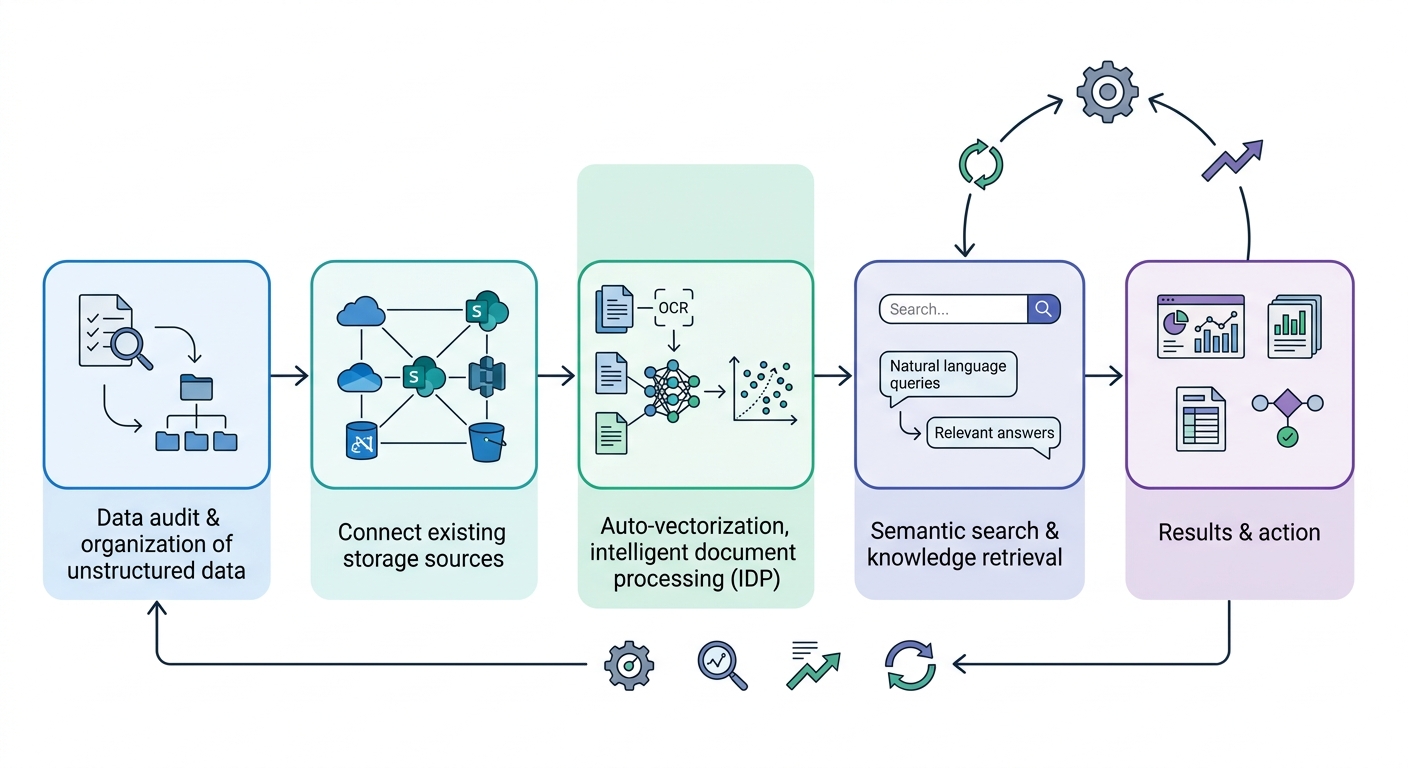
A step-by-step business process flow starting with a data audit, moving through connection and vectorization steps, and concluding with a feedback loop for continuous improvement.
